Shopify product personalizer comparison Kastomise vs Customily
Customily is the feature-rich personalizer for selling across marketplaces: built-in AI photo tools, clipart and ready-made designs, conditional logic and a dozen print-on-demand integrations, for US$49 a month plus US$0.10–$1 per personalized item. Kastomise is narrower and priced flat: no per-item fees, a live preview on your exact print area, a print-ready file for every print area, and an optional 3D view.
From A$69 / US$50 a monthCUS$49 a month per platform
Per-order fees
NoneCUS$0.10–$1 per item
Free plan or trial
Yes: Free plan, no time limitCPartly: 9-day trial
A photo golf ball ordered through a Kastomise Hosted link: the photo the shopper uploaded and the name they typed, beside the print file the shop gets. Beside it, the three numbers merchants ask first, from the table below.
Which one should you choose?
It comes down to what you sell and how you print it. Here’s where each one fits.
CMYK PDF/X-4
Laser SVG
Choose Kastomise if…
Best for flat pricing, CMYK print files and 3D.
You don’t want to pay per personalized item: Kastomise has no per-item or per-order fees.
You print, engrave or cut in-house and want a CMYK PDF/X-4, PNG or JPEG, or a laser or cutter SVG for each print area, in the format you choose per product.
You want shoppers to see their finished design on a 3D model of the product.
Designs must fit an exact print area, with cutouts or fixed items, using only your fonts and layouts.
Core from A$69 a month (US$50 through Shopify), Pro with 3D from A$179 a month (US$127 through Shopify), Studio with the 3D teaser from A$319 a month (US$223 through Shopify). Priced by the number of product setups.
US$49 a month per platform
US$49 a month per platform (Shopify, Etsy, Amazon, WooCommerce, Shoplazza), for unlimited stores and products. A Standalone plan for other platforms is US$299 a month; Enterprise is quoted.
Per-order fees
None
None.
US$0.10–$1 per item
Yes, per unique personalized item: US$1 each for the first 100 in a month, then US$0.50 (to 1,000), US$0.25 (to 10,000) and US$0.10. No percentage commission.
Free plan or trial
Yes: Free plan, no time limit
Free plan: one product setup, no time limit, no card. Paid plans have no separate trial.
Partly: 9-day trial
9-day free trial. Its free plan is for development stores only.
Where it works
Stores and marketplaces
Shopify, or any store via a hosted page
Shopify, as a theme app block with no code; or any other store or marketplace (WooCommerce, Etsy, Wix, BigCommerce), and orders taken by email, phone or at the counter, through a Kastomise Hosted page and a design code. Each shop runs one of the two.
Eight platforms, more via its API
Shopify, Etsy, WooCommerce, Amazon, Shoplazza, BigCommerce, Magento and Walmart; Wix, Squarespace and TikTok Shop through its API or an iframe.
Languages
Partly: English; your own labels
English. You can rename the Customise button and write your own label for every step.
Partly: App in 11 languages
App available in 11 languages, per its listing; support in English, Spanish and Vietnamese. Storefront translation isn’t mentioned.
What shoppers can do
Photo upload
Yes: Photo layouts you draw
JPG, PNG, HEIC, WebP, SVG or PDF, in photo layouts you draw, from one photo to a collage of more than four; drag and zoom. No rotate or filters.
Yes: Zoom, rotate and move
JPG, PNG, BMP or HEIC; shoppers can zoom, rotate and move their photo.
Text and fonts
Yes: A font per line, or a font list
Shoppers type their text and pick its color and alignment, within your character limits. You give each line one of your fonts, including uploaded ones, or let shoppers pick from a list you choose.
Yes: Curved and warped text
Single-line, multi-line, curved and warped text. You upload fonts (TTF or OTF); shoppers pick from the fonts and colors you offer.
Live preview
Yes: Live 2D on your real print area
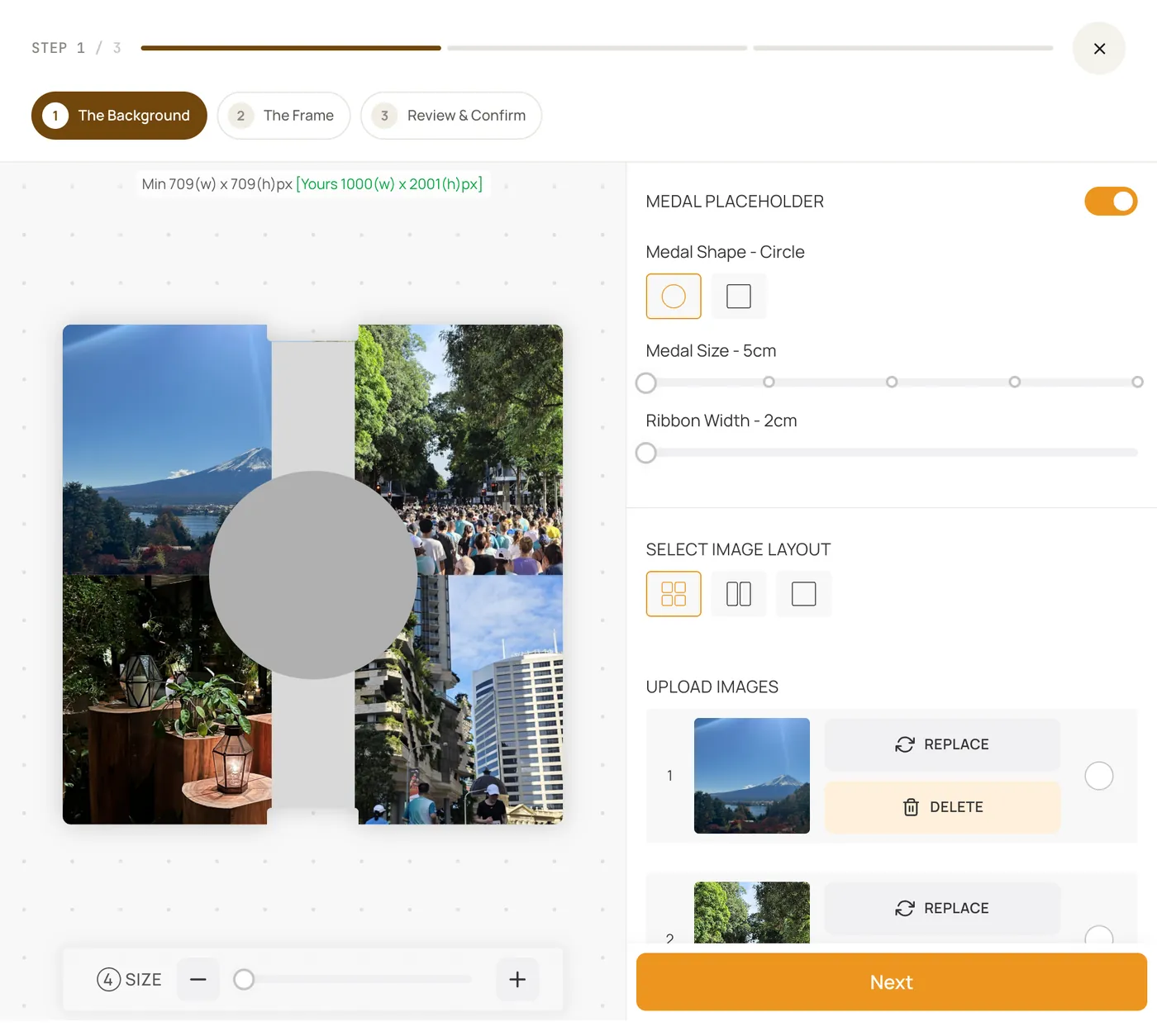
Live 2D preview on your real print area, with cutouts and fixed items (like a medal) shown.
Yes: Live 2D, with mockups
Live 2D preview in a pop-up, behind a button or on the product page, with unlimited mockups.
3D and AR
Partly: 3D view on Pro; no AR
Pro: the finished design in 3D, on a stock mug or tumbler or your own 3D model (a .glb or .gltf you supply), with a color picker for each area of your model. Studio adds a 3D teaser in your product gallery, on your own model. No AR.
Not mentioned
Not mentioned.
AI photo tools
No: None
None.
Yes: Built in, no extra cost
Built in at no extra cost: background removal or blur, face cut-out, photo enhancement, and style effects such as watercolor and cartoon.
Clipart and design templates
Partly: Your own designs
Your own SVG designs for shoppers to choose from, each able to set its own lines and fonts, plus “Upload your own” for a logo. No clipart library.
Yes: Thousands of assets
Thousands of royalty-free clipart assets and hundreds of ready-made designs, plus Canva and PSD import, maps, star maps, calendars and QR codes.
Options, conditional logic, add-on pricing
Partly: Add-on prices for layouts
Shoppers choose between your customization types (Shopify variants) and layouts. A layout can carry an add-on price, charged in the Shopify cart. No conditional logic.
Yes: Logic and add-on pricing
Conditional logic with AND/OR rules. Add-on pricing adds a separate Shopify product, priced at the extra amount, to the cart.
Print production
Print-ready files
Yes: PDF/X-4, PNG, JPEG, SVG and DXF
A file for each print area, in the format you choose per product: a CMYK PDF/X-4 with an embedded color profile (FOGRA39 or GRACoL 2013), an sRGB PNG or JPEG, a laser SVG or PDF in mm, or a cutter SVG for vinyl with a DXF download. Mirroring and bleed; crop marks, cut lines and white ink on the PDF. Images at 72–600 PPI (300 by default). Download from the dashboard.
Yes: PNG, PDF, EPS, AI, DXF and more
PNG, JPG, PDF, EPS, DXF, AI and more, with resolution and color-mode settings and mirroring. File links appear in the Shopify order.
Print areas
Yes: Any shape, with cutouts
Several print areas per product, in any shape, with cutouts or fixed items the design must avoid.
Yes: Several, with custom shapes
Several print locations per product (such as front and back), and custom-shaped photo areas from a mask image.
How setup works
From your print template, at true size
Upload your supplier’s SVG or PDF print template and its trim, cut outlines, bleed and safe lines become print areas at their real size, which you review before anything is made. Or type each size from your supplier’s spec, in centimeters or inches. The template can sit under the editor’s canvas at its true size, and the files come out at that size.
A canvas, with sizes in mm
A free-form canvas, sized by hand or from an uploaded EPS, PNG or JPG base file, with each element’s position and size shown in millimeters from its top-left corner. Checked October 31, 2026.
Print-on-demand integrations
Not needed
Not needed: you print from the files yourself, or send them to your own printer.
Yes: About a dozen partners
About a dozen listed, including Printful, Printify, Gelato, Gooten, CustomCat and ShineOn.
Support and track record
Done-for-you setup
Yes: Paid done-for-you service
Yes, as a paid service, quoted separately.
Partly: Training and onboarding
One-on-one training and onboarding with its team; pricing not stated.
Shopify App Store reviews
New: no reviews yet
New: listed in September 2026, no reviews yet.
4.9 from 276 reviews
4.9 from 276 reviews. Listed since April 2020, with the Built for Shopify badge.
Kastomise Hosted page Live demo screen
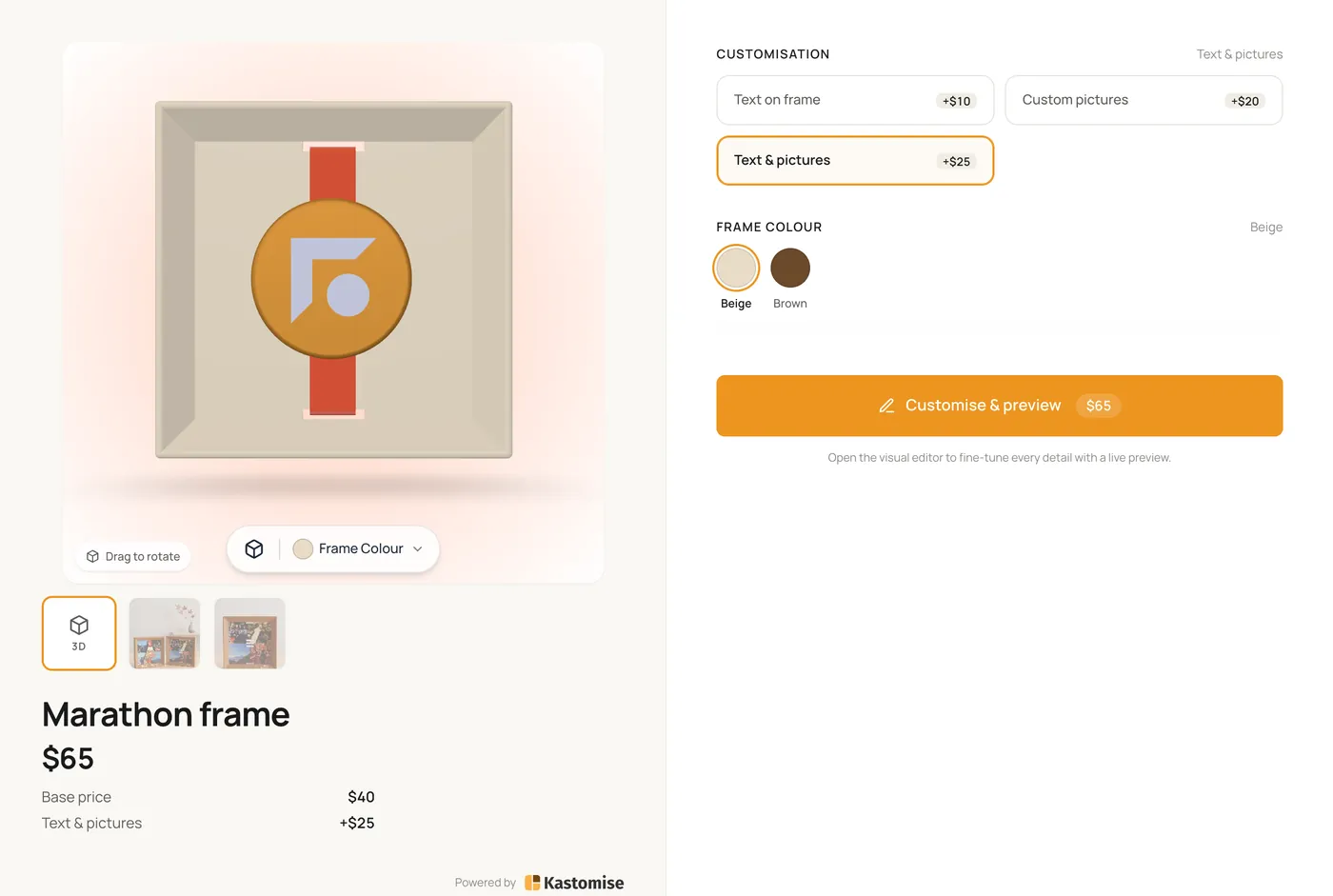
The hosted demo page. Link to it from any store or marketplace; on Shopify, the same customizer opens from your own product page.
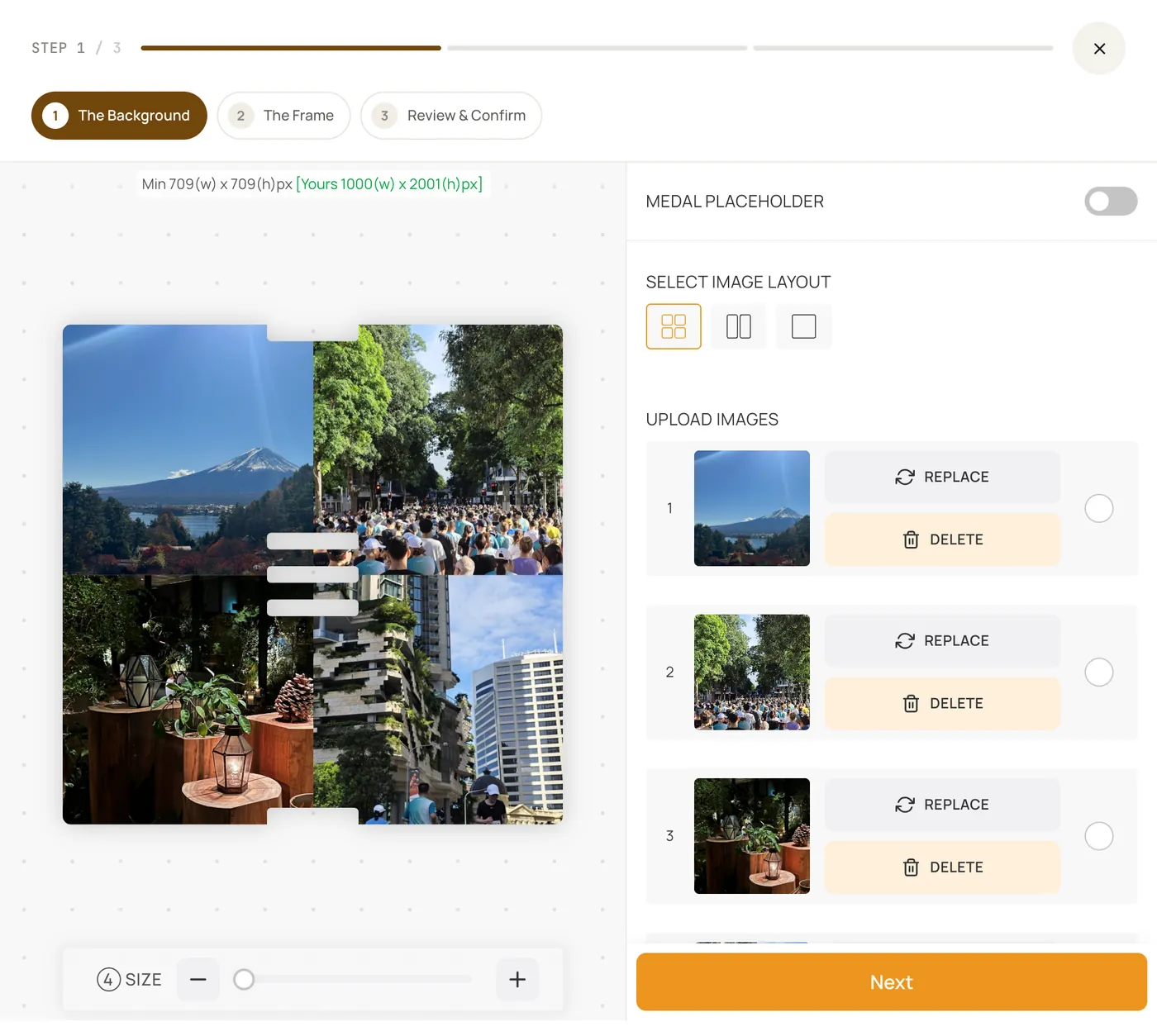
Step 1 on the hosted demo: four photos in the grid layout. Shoppers switch between one photo, two side by side or a grid of four, then drag and zoom each one.
Print areas, checked before the cart Live demo screen
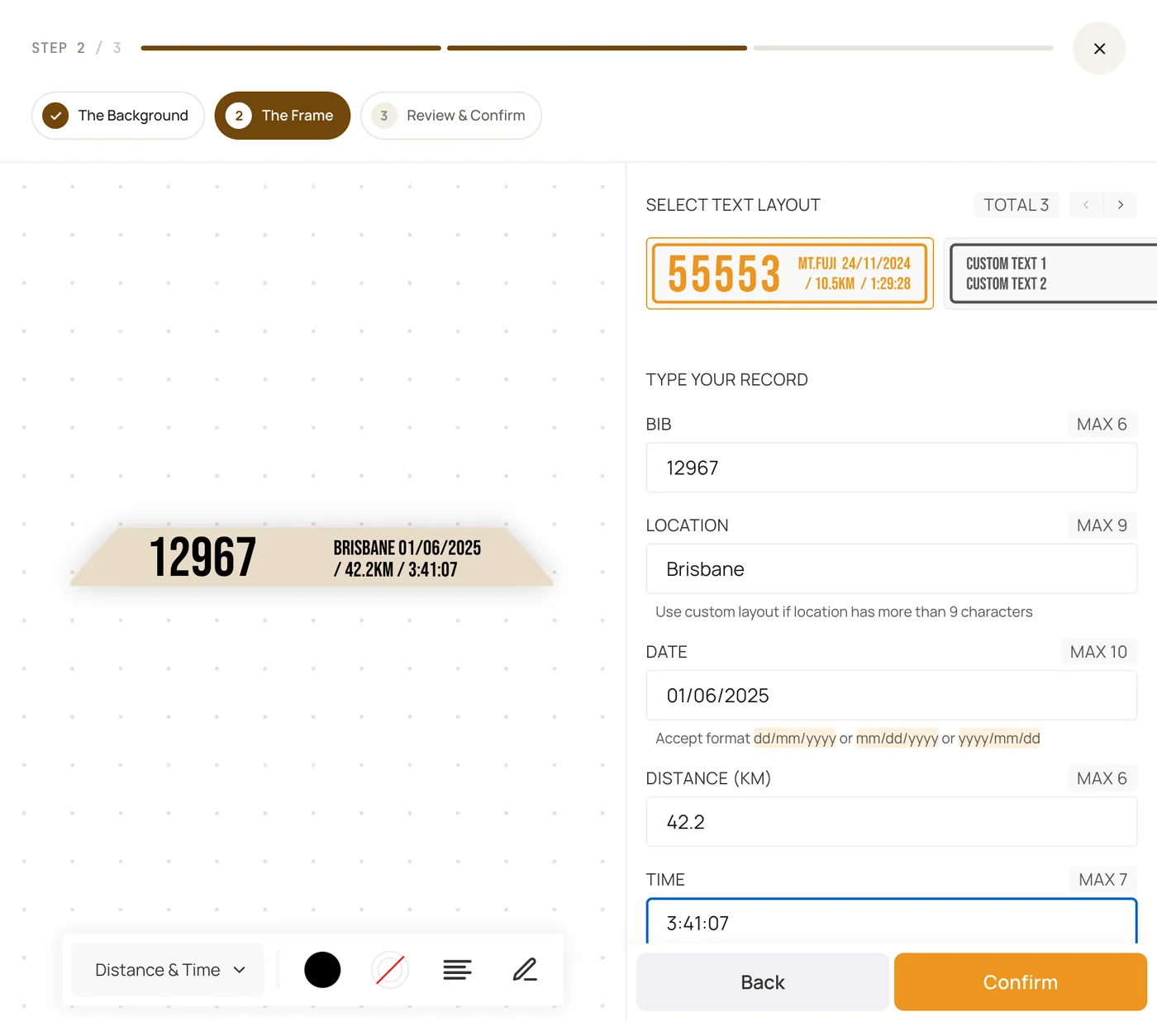
Review & Confirm: each print area as it will print, beside the 3D view. Every order then has a print file for each print area in your dashboard, in the format you chose.
Where the two really part ways, and which side each one favors.
Kastomise
Noper-itemfees
Pricedbyproductsetups
CCustomily
US$49amonth
PlusfromUS$1anitem
Kastomise is stronger
Per-item fees or a flat plan
Customily charges US$49 a month plus a fee for every unique personalized item, starting at US$1 each, so 100 personalized items in a month adds US$100. Kastomise has no per-item or per-order fees: you pay for the number of product setups, however many orders you take.
Kastomise
A3DmodelonPro
A3DteaseronStudio
CCustomily
No3Dmentioned
Kastomise is stronger
A 3D view of the finished design
On Pro, Kastomise shows the shopper’s finished design on a 3D model of your product, with a color picker for each area; Studio adds a 3D teaser in your gallery. Customily’s site and listing don’t mention 3D.
Kastomise
CMYKPDF/X-4,PNGorJPEG
Laserandcutterfiles
CCustomily
EPSandAIfiles
Resolutionandcolormode
Depends on your store
Print files
Kastomise gives a print-ready file for each print area, in the format you choose per product: a CMYK PDF/X-4 with an embedded color profile, a PNG or JPEG at the resolution you set, a laser SVG or PDF in mm, or a cutter SVG for vinyl with a DXF download. Customily offers formats Kastomise doesn’t, such as EPS and AI, with resolution and color-mode settings, which may suit you if your workflow runs on those files.
Kastomise
Shopify
Ahostedpageforanystore
CCustomily
Etsy,Amazon,WooCommerce
US$299Standaloneplan
Depends on your store
Where each one works
Customily connects natively to Etsy, Amazon, WooCommerce and more, with a US$299 Standalone plan for other platforms. Kastomise runs on Shopify, and its hosted page, included in every plan, works with any other store through a design code.
Kastomise
Theirownphotosandtext
Ordesignsyouupload
CCustomily
AIphototoolsandclipart
Ready-madedesigns,starmaps
CCustomily is stronger
Creative tools: Customily’s strength
Customily includes AI photo tools, thousands of clipart assets, ready-made designs, and maps, star maps and calendars. Kastomise has none of these built in: shoppers place their own photos and text, or choose from designs you upload, accurately on your print area.
Kastomise
Add-onpricesforlayouts
Youprintfromthefiles
CCustomily
Conditionallogic
About12print-on-demandpartners
CCustomily is stronger
Logic and print-on-demand
Customily has conditional logic, charges for options by adding a priced product to the cart, and connects to about a dozen print-on-demand partners. Kastomise has no conditional logic or print-on-demand partners: it charges add-on prices for layouts through a hidden product in the Shopify cart, and you print from the files.
Pricing compared
Entry prices, what each one charges per order, and a month worked through with real numbers.
Kastomise
FromA$69a month
Core, for 5 product setups · US$50 through Shopify · free plan for one product setup
No per-order fees and no cap on orders
Free plan: one product setup, no time limit, no card
3D view on Pro, from A$179 (US$127 through Shopify)
Priced by product setups; one product setup can be linked to as many products as you like
CCustomily
FromUS$49a month per platform
Plus a fee for every personalized item
US$1 per unique personalized item for the first 100 a month, then US$0.50, US$0.25 and US$0.10
Unlimited stores and products
Standalone plan for other platforms: US$299 a month
9-day free trial; free plan for development stores only
Worked example
100 personalized items in a month
Kastomise
US$50 on Core (5 product setups, through Shopify), with no item fees
Customily
C
US$149: the US$49 plan plus 100 items at US$1
Customily’s plan covers unlimited products; Kastomise counts product setups.
Customily is US$49 a month per platform, plus a fee for every unique personalized item: US$1 each for the first 100 in a month, falling to US$0.50, US$0.25 and US$0.10 as volume grows, with no percentage commission. So a month with 100 personalized items costs US$149. Its Standalone plan, for platforms such as BigCommerce, Wix and Squarespace, is US$299 a month plus the same item fees. Kastomise is free for one product setup, then starts at A$69 a month (US$50 through Shopify) for 5 product setups, the same however many orders you take. Customily’s plan covers unlimited products, while Kastomise counts product setups (one product setup can be linked to as many products as you like), and Kastomise’s 3D view needs the Pro plan, from A$179 a month (US$127 through Shopify).
It is if you want flat pricing without per-item fees, a print-ready file for every print area, or a 3D view of the finished design. If you depend on Customily’s AI photo tools, clipart library, conditional logic or print-on-demand integrations, Kastomise doesn’t replace those.
How much does Customily charge per order?
Customily charges per unique personalized item on top of its US$49 monthly plan: US$1 each for the first 100 in a month, then US$0.50 up to 1,000, US$0.25 up to 10,000 and US$0.10 after that, according to its pricing page. Kastomise has no per-item or per-order fees.
Does Customily offer a 3D preview?
Its website and Shopify App Store listing don’t mention 3D or AR. Kastomise’s Pro plan shows the shopper’s finished design on a 3D model of your product, with a color picker for each area.
Which is better for print files, Kastomise or Customily?
Both produce print-ready files. Kastomise gives a file for each print area, in the format you choose per product: a CMYK PDF/X-4 with an embedded color profile, a PNG or JPEG at the resolution you set, a laser SVG or PDF in millimeters, or a cutter SVG for vinyl with a DXF download. Customily offers formats Kastomise doesn’t, such as EPS and AI, with resolution and color-mode settings, so it may suit you better if your workflow needs those files.
Your next personalized order, print-ready.
One product setup free. No credit card, no time limit.